Crown Street, Wollongong, 2500

Google Business Profile Posts: Why Your Business Should Be Posting More Often and How to Schedule Posts in Advance
Melody Jaimon • March 25, 2026
Most businesses claim their Google Business Profile, add the basics, upload a few photos, and then leave it there.
Maybe they post once a month. Maybe they only update it when they remember. Maybe they do nothing at all.
That is a missed opportunity.
Your Google Business Profile is often one of the first things people see when they search for your business name, your services, or businesses like yours in the local area. Google says Business Profile posts can appear on Search and Maps, where customers can find announcements, offers, updates, and event details as they browse.
So if your profile is one of the first impressions people get of your business, it should not look static.
It should look active, current, useful, and worth clicking on.
That is where Google Business Profile posts come in.
Posting regularly gives you a simple way to keep your profile fresh, promote your services and offers, share timely updates, and drive traffic back to your website. It also works best when the rest of your profile is in good shape too, from setting up and optimising your Google Business Profile to choosing the right business categories and adding products to your Google Business Profile.
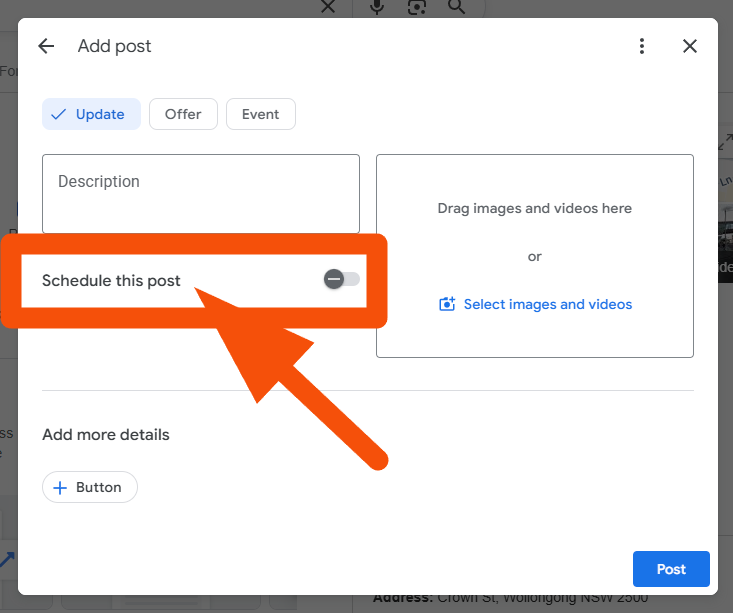
And now there is even more reason to take posting seriously, because Google’s current desktop help instructions include a native “Schedule this post” option inside the posting workflow. That means businesses can now schedule posts in advance directly through Business Profile, rather than relying on manual posting or third-party tools.
What Are Google Business Profile Posts?
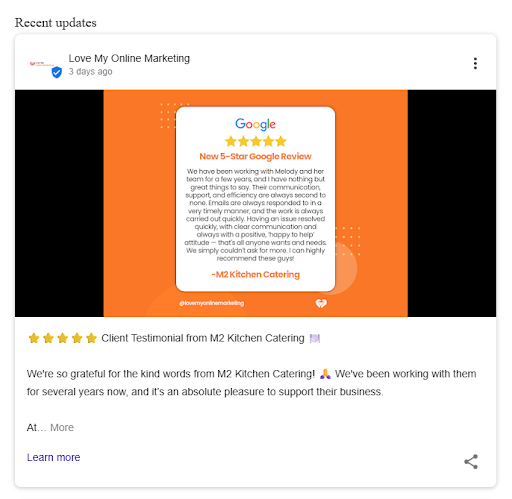
Google Business Profile posts are updates you can publish directly to your listing on Google. Google says they can be used to share announcements, offers, updates, and event details with customers on Search and Maps. Posts can include text, photos, or videos, and customers may find them in the Updates or Overview tabs on mobile and in the From the owner section on desktop.
In simple terms, they give you a way to speak to potential customers while they are already looking at your business.
That matters because your profile is no longer just a citation or a directory listing. It is part of your marketing.
People still search for Google My Business posts, even though the platform is now called Google Business Profile, so it makes sense to naturally cover both phrases throughout your content. But the goal is the same either way: keep your Google presence active and helpful.
Why Posting on Google Business Profile Matters
Google says posts help businesses share up-to-date information, promote sales, specials, events, news, and offers, and engage customers through photos and videos. Google also says that when customers find the latest updates on a Business Profile, it helps them decide to visit the business.
That is a big reason posting matters.
When someone lands on your profile, they are often making a quick decision. They are comparing businesses. They are checking whether you look active. They are deciding whether to click through, call, or move on.
A profile with recent, relevant posts can help your business feel more current and more trustworthy than one that has clearly been ignored.
Posting also gives you more space to talk about what matters right now. Your main profile details stay relatively fixed, but posts let you highlight new services, special offers, seasonal campaigns, blog articles, events, and updates as they happen.
Regular posting can also support stronger visibility in Google’s local results and map pack. While Google does not publicly confirm posting frequency as a direct ranking factor on its own, it does say local ranking is influenced by relevance, distance, and prominence, and an active, well-managed profile can contribute to a stronger overall local presence.
That makes Google Business Profile posts useful not just for visibility, but for trust and conversions too.
It also connects naturally with your wider local strategy, including how local SEO can help small businesses compete with big brands.
The Different Types of Google Business Profile Posts
One of the key things people want to know is what types of Google Business Profile posts they can actually create.
Google’s help documentation says businesses can create three main types of posts: Updates, Offers, and Events.
Update posts
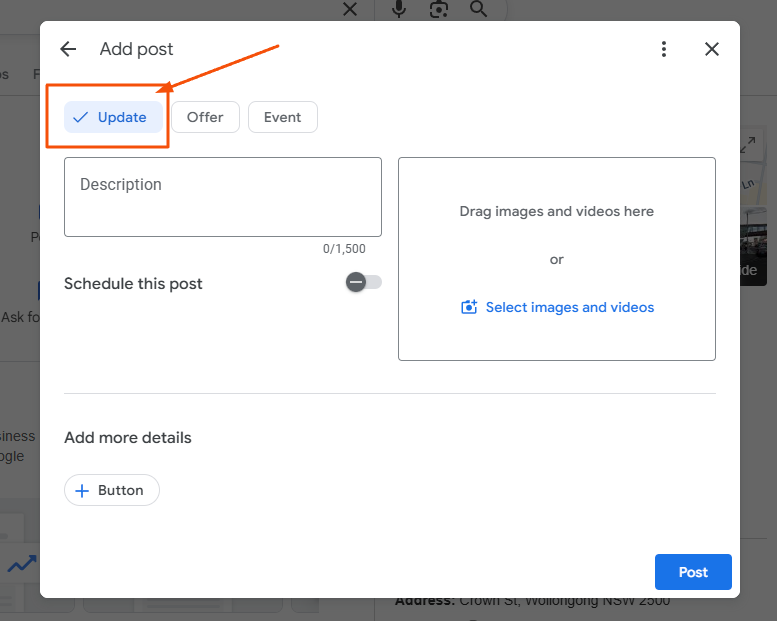
Update posts are the most flexible.
Google says Update posts let you share information about your business and can include a description, photo, video, and an action button with a link. That button should take customers to a page where they can complete an action, such as making a booking, ordering online, or learning more.
These are ideal for service highlights, tips, blog content, recent work, general announcements, and local updates.
Offer posts
Offer posts are for promotions.
Google says Offer posts are designed for promotional sales or deals and require a title, dates, and time. They automatically include a View Offer button and can also include a description, photo, video, coupon code, link, and terms and conditions.
These work well for limited-time deals, seasonal discounts, launch offers, and promotional campaigns.
Event posts
Event posts are for anything tied to a specific date or time.
Google says Event posts can include a title, start and end dates, and times. If you do not add a start or end time, the event shows as lasting 24 hours on the relevant dates. Event posts can also include a description, photo, video, and an action button.
These are useful for workshops, launches, open days, community events, webinars, and in-store promotions.
What Should You Post on Google Business Profile?
Many businesses assume they do not have enough to say.
Usually, the problem is not a lack of ideas. It is a lack of structure.
You can post about a service you want more enquiries for, a seasonal reminder, a current offer, a common customer question, a recent result, a blog article, a product range, a local event, or a behind-the-scenes update.
The best posts are not necessarily the most polished. They are the ones who are relevant to the customer and are already looking at your business.
So rather than asking, “What should I post?”, a better question is, “What would be useful for a potential customer to see today?”
That shift makes content planning much easier.
Why the Learn More Button Matters
This is one of the most useful features in Google Business Profile posts and one that should not be overlooked.
The Learn more button gives you a clear way to send traffic from your Google Business Profile straight back to your website.
That means your posts are not only there to keep your profile active. They can also support your wider SEO and marketing strategy by directing people to the most relevant page on your site based on what the post is about.
For example, if you are promoting a new Wollongong web design service, your post can link directly to your website.
If you are highlighting support for disability providers or launching a service around NDIS web design, the Learn more button can take people straight to your
NDIS website design page.
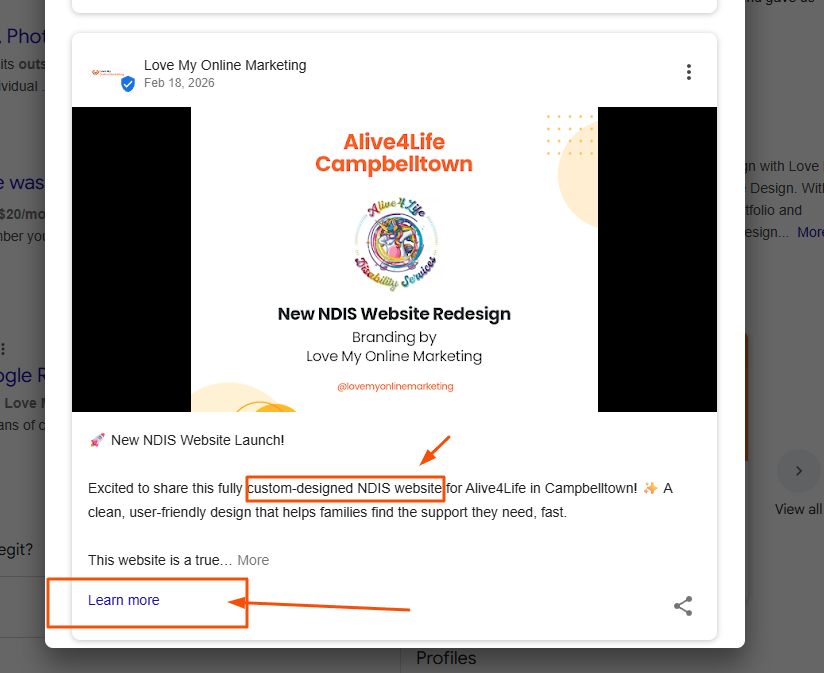
This is a much smarter approach than sending every click to your homepage without thinking about the next step.
When the post topic matches the page you are linking to, it creates a more relevant experience for the person clicking through. It also gives you a better chance of turning that click into an enquiry because they land on a page that directly matches their interest.
So rather than treating the Learn more button as an afterthought, use it strategically. Link to the page that best fits the service, location, or keyword focus of the post.
That might be a service page, a location page, a landing page, or a more specific offer page, depending on what you are promoting.
Used well, this makes your Google Business Profile posts more than just profile updates. It turns them into another pathway back to the pages on your website that are designed to rank, convert, and support your business goals.
How Often Should You Post on Google Business Profile?
This is where many businesses get it wrong.
A lot of businesses post a monthly update and assume that is enough.
It is better than nothing, but in our view, it is not ideal if you want your profile to feel genuinely active.
We generally recommend posting on Google Business Profile 2–3 times a week.
That gives you far more opportunities to highlight different services, share offers, answer common questions, build trust, and support stronger visibility in Google’s local results and map pack. When your profile is updated regularly, it sends a much stronger signal that your business is active and engaged than a single monthly post ever will. While Google’s published local ranking guidance centres on relevance, distance, and prominence rather than posting frequency by itself, frequent updates can still help strengthen the overall quality and freshness of your profile.
When a business only posts once a month, the profile can still feel static. When it posts several times a week, there is a much better sense of momentum and activity.
That does not mean every post needs to be long or complicated. In fact, simple and useful usually works best. But frequency does matter.
If your goal is to get more value from your profile, then 2–3 Google Business Profile posts a week is a far stronger target than a single monthly update.
Why Scheduling Google Business Profile Posts Is Such Good News
This is exactly why Google’s native scheduling feature matters so much.
Google’s help instructions say that if you want to publish a post later, you can turn on “Schedule this post” and choose the date and time you want the post to publish.
That is a big improvement.
For years, businesses often relied on manual reminders or third-party tools to stay consistent. Now, Google’s own posting workflow supports scheduling in advance, making it much easier to maintain a stronger posting rhythm.
That matters even more if you are aiming for 2–3 posts a week.Because most businesses do not underpost because they do not care. They underpost because they are busy. Posting keeps slipping down the list.
Scheduling solves a lot of that problem.
Instead of trying to remember every post manually, you can plan your content ahead of time, batch it in one sitting, and let it publish automatically.
That makes consistency much more realistic.
Great News for Local Businesses: Native Scheduling Has Finally Arrived
Great news for local businesses: the native “Schedule this post” feature has finally gone live in Google Business Profile.
Instead of relying entirely on third-party tools, businesses can now plan and queue content directly through the posting workflow. That means you can schedule Updates, Offers, and Events ahead of time, keep your profile fresh, and maintain a stronger posting frequency without constant manual effort. Google’s current instructions show the scheduling step as part of the post creation process.
One sensible note to include is that Google also says some Business Profile management features can vary depending on platform and device, so it is safest to describe scheduling as something currently shown in the main workflow rather than assume it looks identical everywhere.
How to Schedule Google Business Profile Posts in Advance
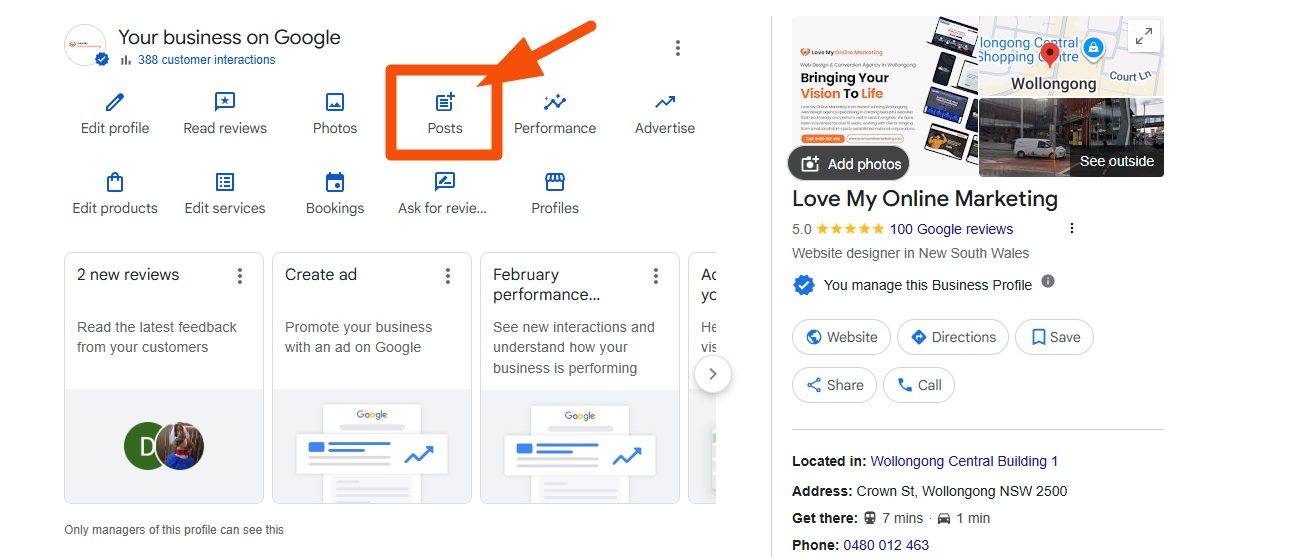
Go to your Business Profile, select Posts, choose the post type, add the elements you want, enter the post information, and, if you want to publish later, turn on Schedule this post and choose the date and time.
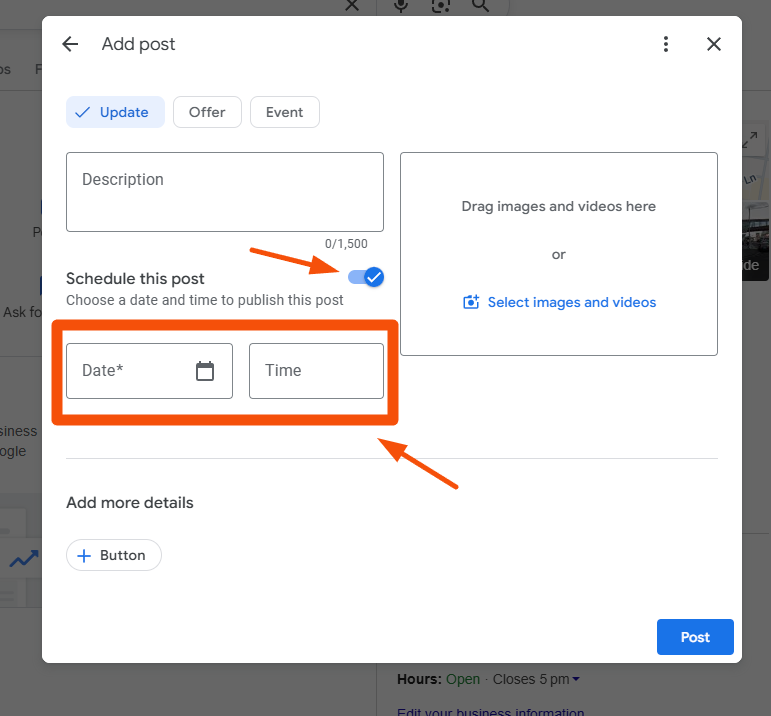
In practical terms, that means you can schedule posts like this:
- Go to your Business Profile.
- Open the Posts area.
- Choose your post type, whether that is Update, Offer, or Event.
- Add your copy, image or video, and your button link.
- Turn on Schedule this post.
- Choose your publish date and time.
- Review everything and publish.
That is a much more efficient workflow, especially for busy local businesses trying to stay visible on Google without having to log in every day.
A Better Posting Rhythm: 2–3 Times a Week
This is the part that really ties the article together.
Once you accept that posting once a month is not really enough, scheduling stops being a nice extra and starts becoming a practical solution.
A strong rhythm for many businesses is:
- one service-focused post
- one helpful advice or FAQ post
- one promotional, trust-building, or event-related post
That gets you to 2–3 posts a week without overcomplicating the process.
It also gives your content variety.
One post can drive traffic to a service page. Another can answer a common question. Another can promote an offer or point people towards a useful blog post.
Over time, that creates a much more active profile than a single monthly post ever could.
A Simple Monthly Content Plan You Can Batch in Advance
If you want to make this manageable, plan content in batches.
For example, you could sit down once a month and prepare four weeks of posts in one go.
Week one could focus on a service.
Week two could answer a customer question.
Week three could highlight a promotion, offer, or product.
Week four could link to a relevant blog article or share a trust-building update.
Then repeat with fresh topics.
When you use native scheduling, the entire month can be queued in advance, which is exactly why this new feature is so useful.
It turns good intentions into an actual system.
How to Write Better Google Business Profile Posts

Good posts do not need to be complicated.
They just need to be clear.
Start with one message only. Do not try to squeeze multiple ideas into the same post.
Keep the wording direct. Say what the update is, why it matters, and what the next step should be.
Use a relevant image or video when possible, because Google says posts can include visual content as well as text.
Then add the most relevant button and link.
For many posts, Learn more is a great choice because it helps bring people back to your website, where they can explore your services, read your content, or get in touch.
Do Google Business Profile Posts Help SEO?
This is where it is important to stay accurate.
Google says posts help businesses share updates, improve customer experience, promote offers and events, and help customers make better decisions as they browse. Google’s public local ranking guidance highlights relevance, distance, and prominence. It does not say that posting alone is a direct ranking factor that automatically improves local rankings.
So the honest answer is this:
Google Business Profile posts can support your wider local SEO and marketing efforts by making your profile more useful, more active, and more conversion-focused. They can help you get more attention from searchers and send traffic back to relevant pages on your site through action buttons like "Learn more". But they work best as part of a broader local SEO strategy rather than as a standalone tactic. That broader strategy still includes accurate profile information, strong reviews, relevant categories, useful website content, and clear internal linking. Using a
Google Business Profile management platform to keep all of these moving parts consistent makes that broader strategy far easier to maintain.
Final Thoughts
If your business is only posting monthly updates on Google Business Profile, it is probably time to raise the bar.
Posting once a month is a start, but it is not where most businesses will get the best value.
A stronger target is 2–3 Google Business Profile posts a week.
That gives you more chances to stay visible, highlight services, share offers, answer questions, build trust, and send people back to your website. It can also help build a stronger overall local presence and improve map pack competitiveness when combined with the broader factors Google uses for local ranking.
And now that Google’s current workflow includes the native “Schedule this post” feature, staying consistent has become much easier. Businesses can now schedule Updates, Offers, and Events ahead of time directly through Business Profile, which makes a more active posting strategy far more manageable.
So yes, if you are not posting to your Google Business Profile regularly, you should be.
And not just once a month.
You should be aiming for a more consistent, more useful posting rhythm that keeps your business visible where people are already searching.
That is how you turn your profile from a static listing into a much stronger marketing asset.
Frequently Asked Questions
How long do Google Business Profile posts stay visible?
Google Business Profile posts typically remain visible for around six months, although their visibility and prominence may reduce over time. Newer posts are usually shown first, which is why posting regularly helps keep your profile looking current and active.
Do Google Business Profile posts expire?
Standard update posts do not have a strict expiry date, but offer posts and event posts are tied to specific dates. Once the event ends or the offer expires, those posts are no longer highlighted in the same way, making it important to keep publishing fresh content.
Is there an ideal time to post on Google Business Profile?
There is no officially confirmed “best time,” but posting during business hours or peak customer activity times (such as mid-morning or early afternoon) can help increase visibility. That said, consistency matters more than timing, especially when using scheduling to maintain a regular posting rhythm.
Do Google Business Profile posts really help get more customers?
They can. While posts are not a standalone ranking factor, they help make your profile more engaging, informative, and conversion-focused. A well-maintained profile with regular updates can build trust and encourage users to click, call, or visit your website.
Should I include keywords in my Google Business Profile posts?
Yes, but naturally. Including relevant keywords related to your services and location can help reinforce your overall local SEO strategy. Avoid keyword stuffing and focus on writing clear, helpful content first.
What happens if I stop posting on my Google Business Profile?
If you stop posting, your profile can start to feel inactive or outdated, especially compared to competitors who are posting regularly. This may affect how customers perceive your business, even if your core details are still accurate.


Love My Online Marketing has 10+ Years of working alongside businesses and helping them grow. Discuss your options for online success from website Design and Development through to Google Marketing.
Do you want more traffic and business leads?
Love My Online Marketing is determined to make a business grow. Our only question is, will it be yours?