Crown Street, Wollongong, 2500

Business Name & Domain Renewal Invoice Scams in Australia: How to Spot Them
Melody Jaimon • February 16, 2026
If you’ve received a letter or email that looks like an urgent renewal notice for your business name or domain name, you are not alone.
As a Wollongong website design agency, we regularly see small business owners who work alongside us receive official-looking notices requesting payment for renewals, sometimes at inflated prices, sometimes with a “View Invoice” button, and often designed to create urgency.
Some of these notices are misleading. Others are legal third-party services charging a markup to handle a renewal on your behalf.
In both cases, the most important thing to understand is this:
You are not required to use these services.
This guide explains what is happening, how to recognise the warning signs, and what to do if you receive one.
30-second checklist: Is this renewal notice legit?
Before you click, pay, or reply, run through this quick checklist:
- Check the sender domain: Australian government emails typically end in .gov.au
- Don’t click buttons or links: log in directly to ASIC Connect or your registrar instead
- Confirm your expiry date from the official source (ASIC register / registrar dashboard / auDA WHOIS)
- Watch for pressure tactics: “Final Notice”, short deadlines, threats of losing your name/domain
- If you’re unsure: forward the notice to your Australian website provider for a quick check
Related reading: If the notice arrived by email, here’s our step-by-step guide to
preventing email hacking and securing your account.
Why These Notices Exist
Business name details and many domain name records are publicly searchable in Australia. That means third parties can access:
- Your business name
- Your ABN
- Your renewal date
- Your registered contact address
Some companies use this publicly available information to send renewal notices that appear official. These documents are often designed to resemble government correspondence or legitimate invoices.
The goal is simple: prompt quick payment before you verify the details.
Business name renewal notice: how to tell if it’s really from ASIC
In Australia, business names are administered by the Australian Securities & Investments Commission (ASIC).
ASIC sends official renewal reminders approximately 30 days before your renewal date. These reminders are sent to the contact details linked to your ASIC Connect account.
Official ASIC renewal fees are:
- $45 for one year
- $104 for three years
Your business name matters. You’ve worked hard to build it, and you don’t want to risk losing it. So when a renewal notice shows up, the instinct is often to pay it straight away. But it’s worth slowing down, because not every renewal notice that looks official actually is.
Some private companies send official-looking letters or emails just before your real ASIC reminder is due. These notices are designed to look legitimate, but they are not from the government.
Do you have to pay Registry Australia / Registration Pty Ltd? (optional vs required)
What third-party renewal letters look like
Many business owners receive posted letters that:
- Look formal and government-style
- Include your business name and ABN
- Offer renewal options such as $99, $199 or more
- Contain payment instructions
- Use names that sound official
Common examples people report include:
- Registry Australia Pty Ltd
- Registration Pty Ltd
- Online Business Registration
These companies are not ASIC.
They are private businesses that offer to submit your renewal for you at a higher price.

Are these notices illegal?
Not necessarily.
Some third-party providers operate legally and include fine print stating the notice is a “solicitation” rather than a government invoice. However, the presentation can be confusing, especially for new business owners.
The key point remains:
You do not have to use them.
You can renew directly with ASIC at the standard government fee.
How to renew your business name safely (ASIC steps)
Before paying anything:
✓
Check the sender’s email or website
Official government communication will end in
.gov.au. If it does not, it is not from ASIC.
✓
Confirm your renewal date
Search your business name on the
ASIC Business Name Register to confirm:
- The expiry date
- The current registration status
If the notice arrives well outside the 30-day renewal window, it may not be genuine.
✓
Record your renewal date
Add it to your calendar so you’re not relying solely on reminders.
The risks of paying a third party
1) You may overpay
ASIC’s official fees are publicly listed. Third-party providers may charge two to five times more to submit the same renewal.
2) You may lose administrative control
Some third parties require you to authorise them to act on your behalf. In certain cases, this can result in:
- Changes to contact details in ASIC Connect
- Reduced visibility or control over your business name record
- Ongoing administrative involvement you didn’t intend
Maintaining direct control of your ASIC account helps prevent future confusion.
What if you already paid a third party?
If you have paid:
- Contact ASIC as soon as possible
- Confirm your business name is linked to your ASIC Connect account
- Request clarification if any changes were made to your contact details
Refunds from third-party providers are uncommon, but contacting ASIC quickly can help you restore full administrative control if needed.
Domain renewal invoice scam: how to check your domain expiry date
When you register a domain name (such as .com.au, .net.au, or .com), you are licensing it for a set period (usually one to five years). You must renew it before it expires to maintain control.
If a domain is not renewed:
- Your website may go offline
- Business email accounts may stop functioning
- The domain may become available for others to register
Because domains are essential to business operations, renewal reminders are important, but they can also be confusing if the source isn’t clear.
A legitimate renewal notice will typically:
- Come from the company you originally registered with
- Reference your exact domain name
- Direct you to log in to your secure account portal
- Reflect pricing consistent with your usual renewal cost
How legitimate domain renewals work in Australia
In Australia, .au domain names are governed by .au Domain Administration (auDA), the regulatory body responsible for the .au namespace.
Domain registrations are handled through auDA-accredited registrars (authorised providers permitted to register and renew .au domain names).
Domain names are licensed, not purchased
A domain name is not something you permanently own. It operates under a licensing model.
When you register a .au domain, you’re leasing the right to use it for a set period (typically between one and five years). To maintain control of your domain, it must be renewed before the licence period expires.
How to spot a questionable domain renewal invoice
Domain renewal notices sent by email are very common. Questionable ones may:
- Include a PDF invoice
- Request
$150–$300 for one year
- Arrive months before your actual expiry date
- Use urgent language such as “Final Notice”
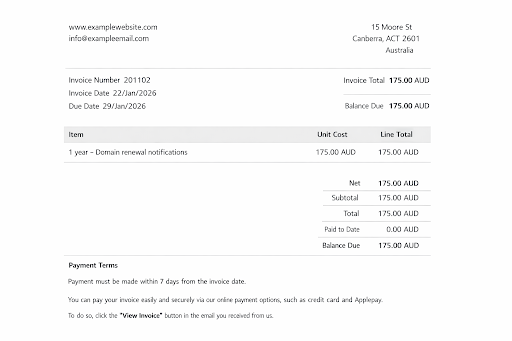
This example we’ve seen is an emailed invoice requesting $175 AUD for a one-year “domain renewal notifications” service.
If you receive a domain renewal invoice by email, run through this checklist before taking action:
✓
Do you recognise the sender?
Is it your actual domain registrar or hosting provider? If not, pause.
✓ Log in to your real provider
Instead of clicking the email link, log directly into your domain provider’s dashboard and check the renewal date there.
✓ Check .au domains via auDA WHOIS
For .com.au or .au domains, you can verify official registration details using the auDA WHOIS tool.
✓ Watch for pressure tactics
Be cautious of short payment deadlines, “Final Notice” language, and urgent warnings about losing your domain.
✓
Check for domain variations
Some invoice-style emails reference a domain name one letter different from yours. Always double-check spelling.
What to do if you receive a suspicious domain renewal invoice
1) Don’t click, reply, or engage
If you weren’t expecting the email, don’t click links or buttons. If it includes an attachment, avoid opening it until you’ve verified the sender independently.
2) Don’t pay straight away
These messages are designed to create urgency. Pause and verify first.
3) Check your actual domain provider
Log in to your official domain registrar account and confirm:
- The expiry date
- The registered provider
- Whether a real renewal invoice exists
If we manage your hosting or website, you can forward the email to us, and we’ll confirm what it is.
4) Look for red flags
Be cautious if the notice:
- Comes from a company you don’t recognise
- Mentions “transfer” instead of renewal
- Lists unusually high fees
- Includes fine print stating it’s a “solicitation”
5) Report the email
You can:
- Mark it as spam or phishing in your email platform
- Report it to
Scamwatch
- Report it to the Australian Cyber Security Centre
6) Contact your registrar directly
If the email claims to be from your registrar, don’t use the contact details inside the email. Go to the official website you know is legitimate and contact them directly.
Protecting one of your business’s most important digital assets
Your domain name is more than just a web address; it underpins your website, email communications, brand credibility, and online visibility. Even a short interruption can affect enquiries, sales, and customer trust.
While many domain renewal emails are legitimate reminders from your registrar, others may be transfer offers that are not immediately obvious. The responsibility ultimately sits with the business owner to verify details before making payment.
By staying organised and checking details carefully, you reduce the risk of unnecessary costs, accidental transfers, and operational disruption.
Note: This article is intended for general informational purposes only and does not constitute legal, financial, or technical advice. Domain regulations, registrar policies, and pricing structures may change over time. Businesses should seek independent professional advice tailored to their circumstances before making decisions about domain registration, renewal, or transfer.


Love My Online Marketing has 10+ Years of working alongside businesses and helping them grow. Discuss your options for online success from website Design and Development through to Google Marketing.
Do you want more traffic and business leads?
Love My Online Marketing is determined to make a business grow. Our only question is, will it be yours?