Crown Street, Wollongong, 2500

How to Choose & Update Google Business Profile Categories
Melody Jaimon • May 13, 2022
Google is the world's most-visited website. That is why creating a Google Business Profile (GBP) is a critical step to attracting new customers through Google Search and Maps.
There are approximately 4,000 business categories to choose from, so it pays to choose categories carefully. Google updates this list often, so the right choice today may not be the best one tomorrow.
Choosing the right primary category and secondary categories can lift your local visibility significantly and influence how customers find your business online. Google Business Profile categories also shape which features appear in your listing. Booking buttons, Google Posts, and reviews are not available for every cagettegory. Hotels and academic institutions, for example, miss out on some of these. Categories also affect the menus, attributes, and hours of operation you can display.
What Are Google Business Profile Categories?
Google Business Profile is a free business listing from Google. It lets you display your location, services, products, and photos, even if you operate across multiple locations. Your profile can appear in Google Search, Google Maps, and Google Shopping.
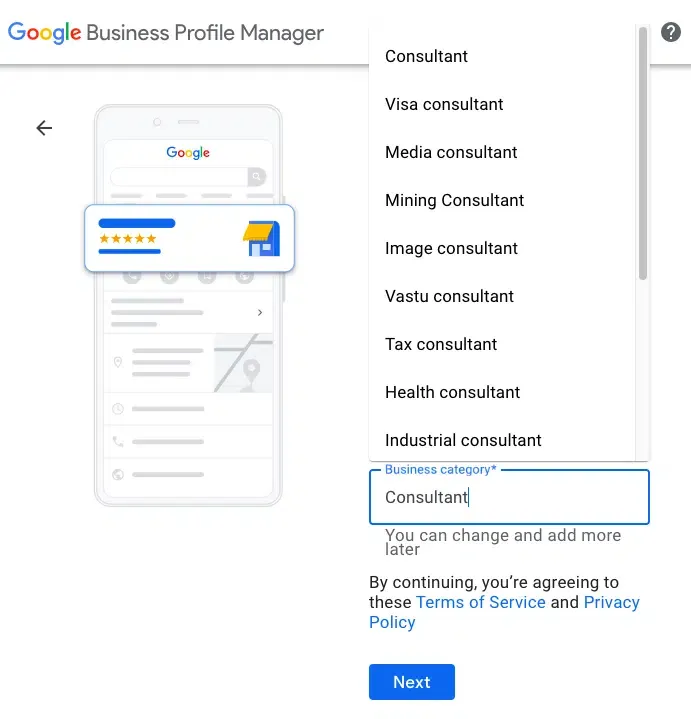
When you create a Google Business Profile listing, one of the first things you do is pick a category. You set one primary category and up to nine additional categories. You cannot create your own categories. You must choose from Google's predefined list.
The right Google Business Profile categories helps local businessesBusiness Profile is a free listing fro appear in relevant searches on Google Maps and in the Local 3-Pack. This is especially useful if you target local customers across different locations.

How To Choose The Best Business Categories
Your Google Business Profile plays a major role in how your business appears on Google Maps and in local search results. For many local businesses, it is often the first impression potential customers see before they even visit your website or social media links. Choosing the right categories helps Google understand exactly what you offer and when to show your profile to the right audience.
Here are some tips on how to select the best categories for your Google Business Profile:
Align Categories with Your Most Profitable Services
Start with what makes your business the most money. Your primary category should clearly represent your core offer, while your secondary business categories should support the other services you provide. The categories you choose shape how customers find your business online and influence the type of searches you appear in.
Research Search Volume
Think about the words potential customers use to find you. Make a list of your business type and its subtypes. Run this list through a keyword research tool. Look for terms with strong search volume. The more people searching for a term, the more value that category can bring.
Check What Your Competitors Are Using
Look at what Google Business Profile categories your top local competitors have selected. The category used most by businesses ranking well is often a strong choice for your own primary category. Make sure your selection follows Google's Guidelines to avoid suspension. Here is how to find a competitor's primary category:
- Go to Google Maps
- Find the competitor's listing
- Right-click on the listing
- Select "View Page Source"
- Open the document search (CTRL + F or CMD + F)
- Search for their business name to locate the category in the source code
Choose the Most Specific Category Available
Broad, general categories are less effective. A more specific Google Business Profile category improves accuracy and helps Google match your listing to the right searches. Avoid vague options when a precise one exists.
Add Secondary Categories Thoughtfully
Once you have your primary category, add related categories to give Google more context. You can choose up to nine business categories. Any strong contenders that did not make it as your primary are good candidates here. That said, using too many additional categories can dilute your focus. Only add categories that are genuinely relevant to your business.
How to Edit Your Google Business Profile Categories
You can change your primary and secondary categories at any time. Changes can be made directly through Google Search or Maps. Simply sign in to the Google Account linked to your Business Profile and update your category from the dashboard.
Google usually reviews and approves category changes within 24 to 48 hours. Keep in mind that changing your primary category may trigger a re-verification request from Google. This is normal and just part of the process.
If your current Google Business Profile categories are not improving your visibility, it is worth revisiting your strategy. Look at your goals again and adjust from there.
Complete List of Google Business Profile Categories (2026)
This Google Business Profile category list below is sorted alphabetically. If you cannot find a category that fits your business exactly, try a broader one as a starting point.
| A |
|
|---|---|
| B |
|
| C |
|
| D |
|
| E |
|
| F |
|
| G |
|
| H |
|
| I |
|
| J |
|
| K |
|
| L |
|
| M |
|
| N |
|
| O |
|
| P |
|
| Q |
|
| R |
|
| S |
|
| T |
|
| U |
|
| V |
|
| W |
|
| X |
|
| Y |
|
| Z |
|
Running a business means juggling many tasks at once. Keeping your Google Business Profile listing current can easily slip down the priority list. But the payoff is real.
Smart category choices lead to better results in local Google searches and on Google Maps. To get the most out of your listing, keep your Name, Address, and Phone Number (NAP) consistent across the web. Make sure your profile is complete and includes a good set of photos.
Before you select business categories, review Google's Guidelines. This helps you follow best practices and avoid any risk of suspension. But if you do get suspended, don't panic. There are steps you can take to get reinstated.
Take your time with the research and set-up phase. Be methodical. Check back periodically too, as new Google Business Profile categories are added regularly. A new category could be the thing that wins you more visibility and more customers.


Love My Online Marketing has 10+ Years of working alongside businesses and helping them grow. Discuss your options for online success from website Design and Development through to Google Marketing.
Do you want more traffic and business leads?
Love My Online Marketing is determined to make a business grow. Our only question is, will it be yours?