Crown Street, Wollongong, 2500

How to Get Your Business Found in ChatGPT: A Guide for Australian Businesses
Melody Jaimon • November 16, 2026
We tested OpenAI's new business-claiming feature with our own agency, Love My Online Marketing. Our business came up straight away, but when we tried to claim it, we were put on a waitlist. Here's what happened, and what it means for Australian businesses.
The way Australians look for businesses is changing. Google is still the big one, but more and more people are asking ChatGPT for recommendations too.
- Instead of typing "digital marketing agency Wollongong" into Google, someone might ask ChatGPT:
- "Can you recommend a reliable digital marketing agency in Wollongong?"
- "Who are the best commercial laser cutting companies in NSW?"
- "Find an Australian web design agency with an in-house team."
- "Which local businesses offer the services I need?"
Now OpenAI has given businesses a way to manage how they show up in those answers.
What Is Businesses in ChatGPT?
Businesses in ChatGPT is a new OpenAI feature that lets businesses claim their listing and manage it through a dashboard called Business Hub. Think of it a bit like a Google Business Profile, but for ChatGPT.
Once your business is claimed and verified, you can:
- Update your business description and website details
- Add accurate information about your products and services
- Add your branding and images
- See how often ChatGPT mentions your business, and how many people click through to your website
- Connect your product information, if you sell online
OpenAI has also launched Business Agents, which let a business offer customers a branded AI chat about its products. For now, these are only available to eligible online stores and online service businesses in the United States.
Good to know: Claiming your listing helps ChatGPT describe your business accurately. It won't make ChatGPT recommend you over your competitors.
Can Australian Businesses Claim Their Business on ChatGPT?
Yes, but most can't do it straight away. OpenAI is opening access gradually, and many Australian businesses are being put on a waitlist first.
What Happened When We Tried
We went to OpenAI's Businesses in ChatGPT page, clicked Claim your business and searched for Love My Online Marketing.
Our listing came up straight away, with our Wollongong address. That told us ChatGPT already knew about us, even though we'd never set anything up.
We selected our business and clicked through, expecting to verify it. Instead, we were asked to join a waitlist. The message said OpenAI is gradually opening access to more businesses and would email us when we could continue.
So if you find your business but get a waitlist, don't worry. You haven't done anything wrong. Join the waitlist and keep an eye on your inbox.
How to Find and Claim Your Business on ChatGPT
Here's how to check whether your business can be claimed. It only takes a few minutes.
Step 1: Go to the Businesses in ChatGPT Page
Go to OpenAI's
Businesses in ChatGPT page and click
Claim your business.
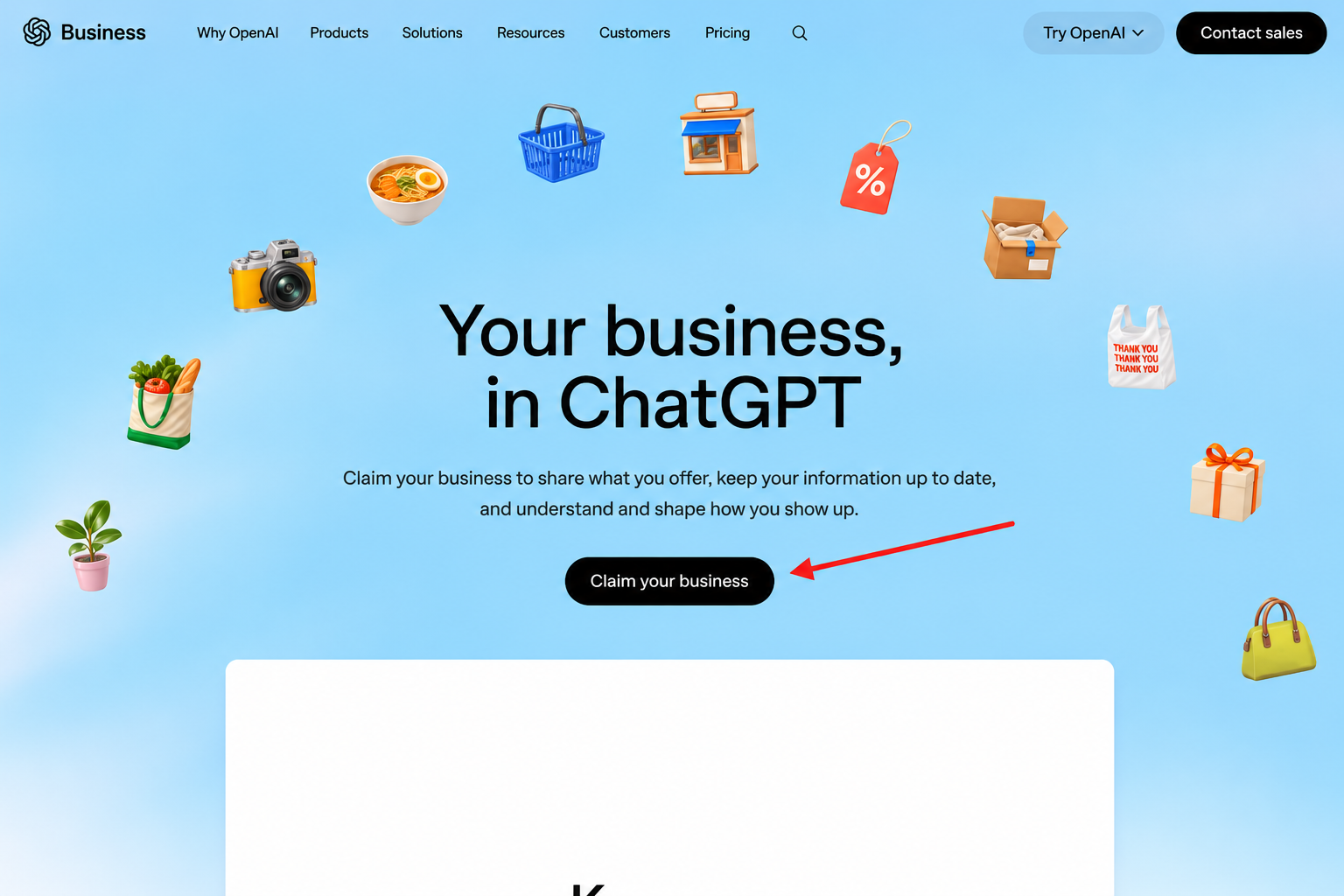
OpenAI's Businesses in ChatGPT page, with the Claim your business button.
Step 2: Search for Your Business Name
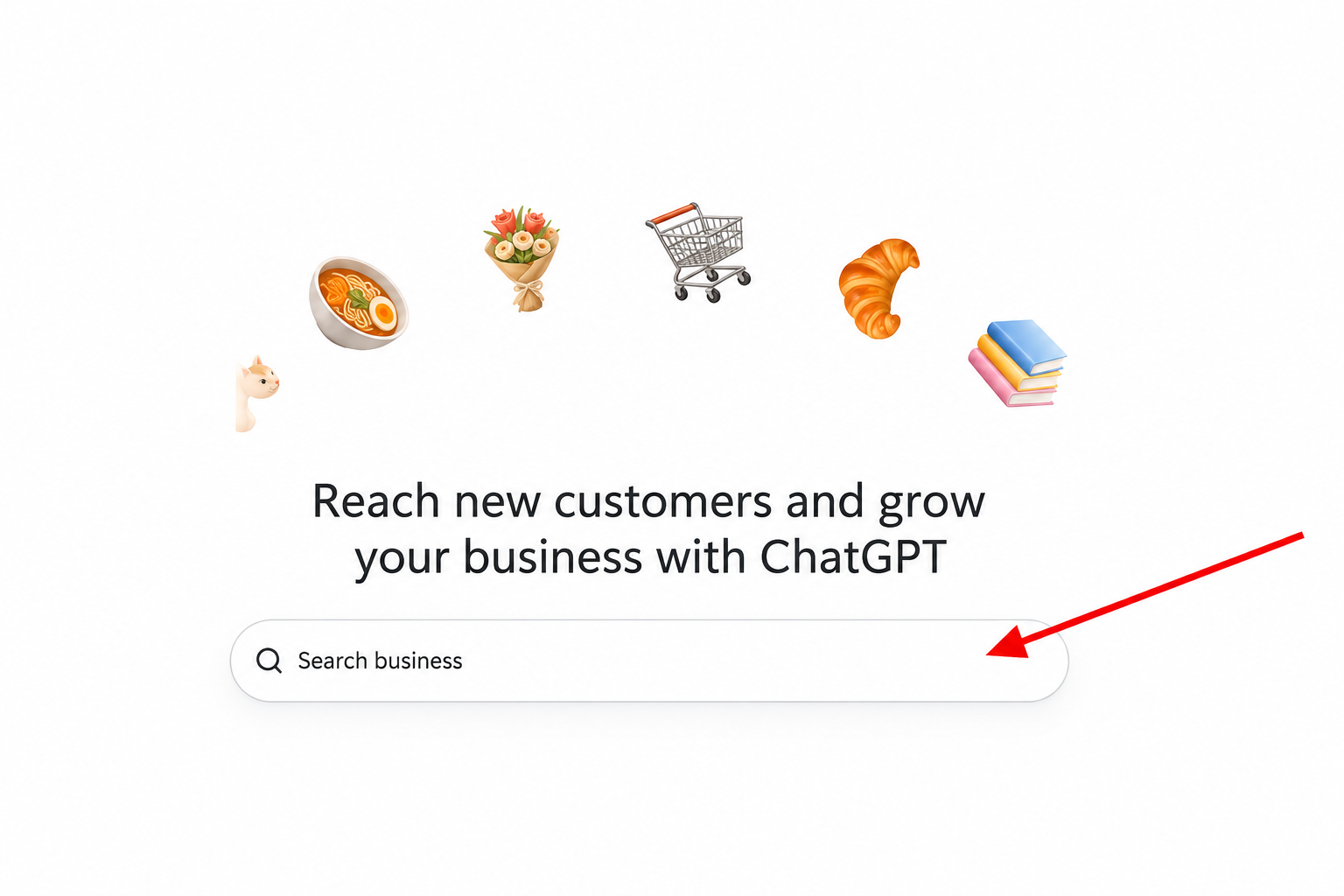
The business search on OpenAI's claim page.
Type your business name into the search field. If your business appears, check that the name and address match yours.
If it doesn't appear, you'll see an option to create a new listing. Only do this if your business genuinely isn't listed, as duplicate listings cause confusion.
Step 3: Select Your Business
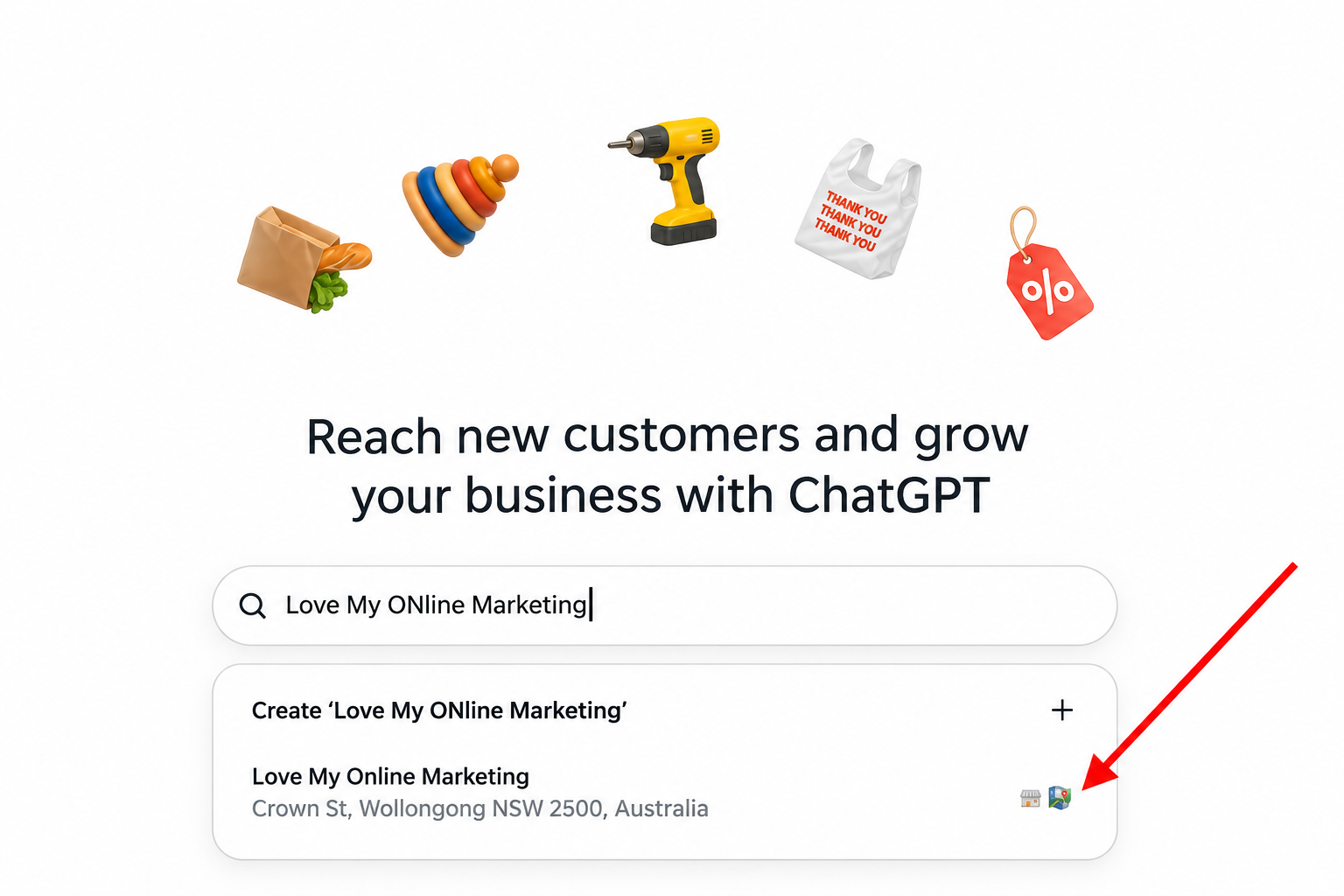
Love My Online Marketing came up in the search with our Wollongong address.
Click your listing. A window opens showing what you'll be able to do once it's claimed. Click Get started.
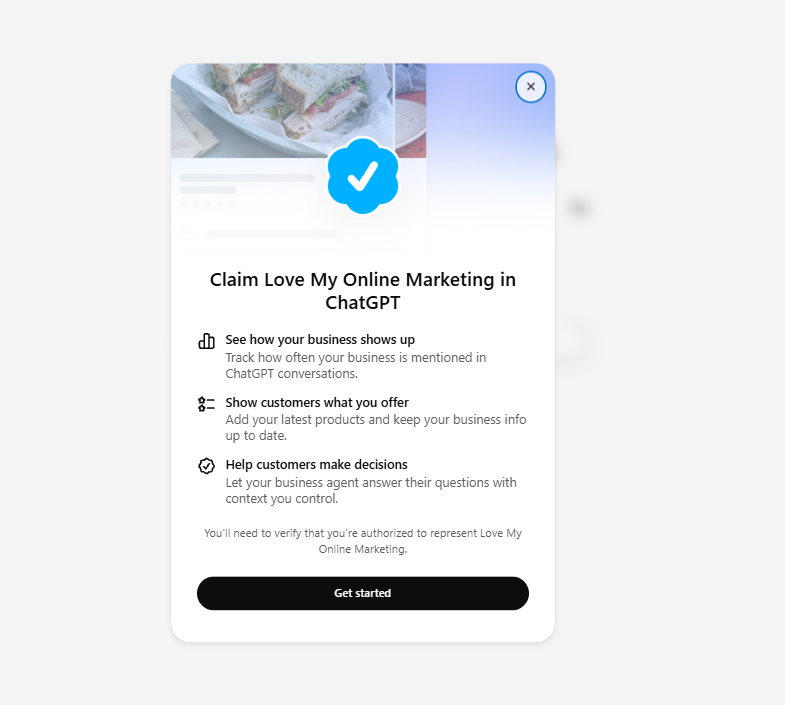
Before you can claim a listing, OpenAI asks you to confirm you're authorised to represent the business.
Step 4: Verify Your Business or Join the Waitlist
Depending on your business and where you are, you'll either be asked to verify your business or invited to join the waitlist.
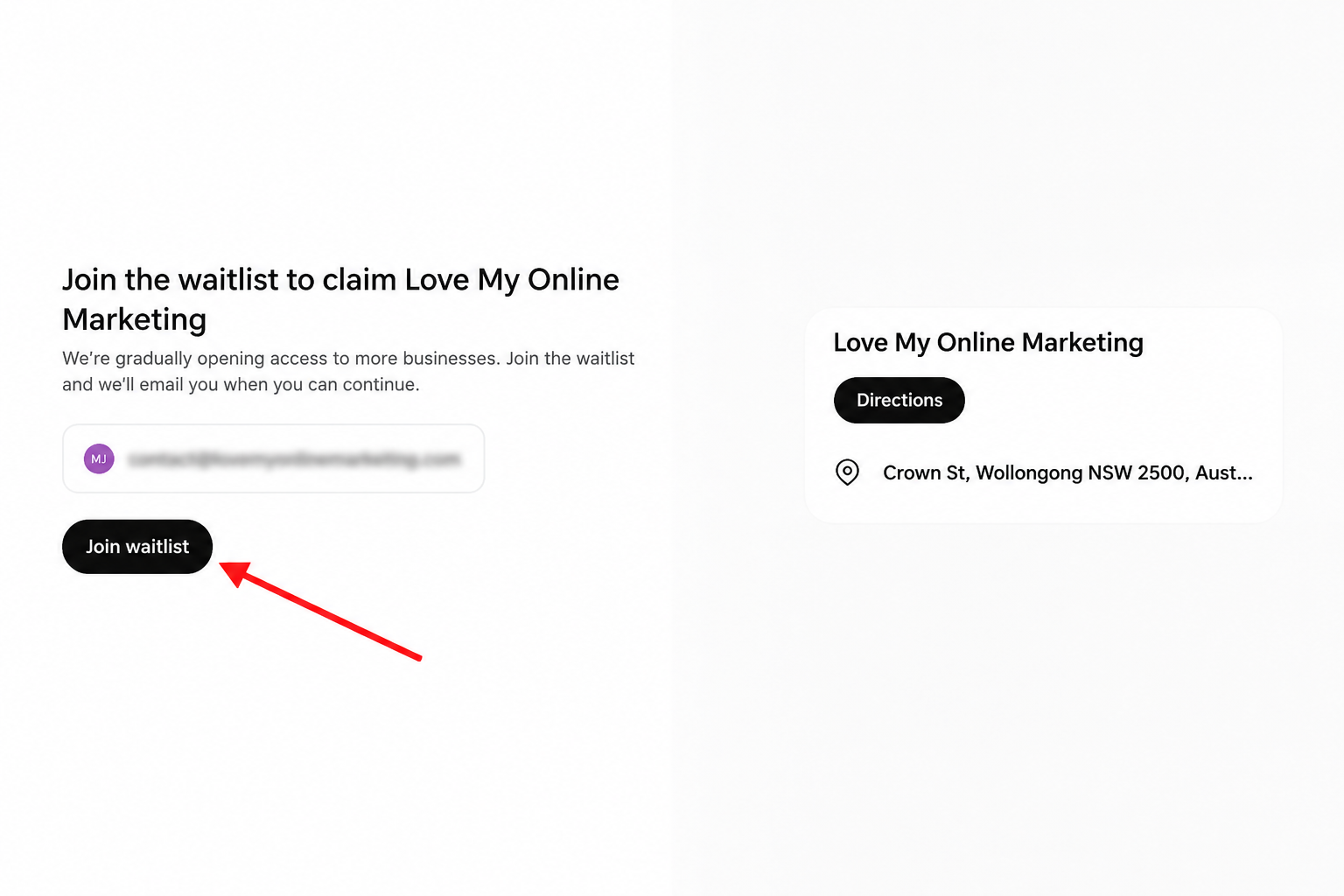
Our business was offered a place on the waitlist while OpenAI opens up access.
If you're offered verification, you'll need to prove you own the business or are authorised to represent it. Businesses that have been let through so far report checks such as a text or call to the business phone number, or a check through the website's domain settings, plus photo ID before they can edit their details.
If you're shown the waitlist, click Join waitlist. OpenAI will email you when you can continue.
Step 5: Fill In Your Details Once You're In
When you have access, make your listing as clear and specific as you can. Instead of calling yourself "a marketing company", list your actual services, the industries you work with and the areas you cover. Use the words your customers use when they describe what they need.
How to Help Your Website Show Up in ChatGPT
Claiming your listing is only one part of it. ChatGPT also learns about businesses from their websites and other information online. Improving that is called AI search optimisation (you may also hear it called AEO or GEO). Here's where to start.
1. Make Sure ChatGPT Can See Your Website
OpenAI uses a crawler called OAI-SearchBot to find websites for ChatGPT search. If your website blocks it, ChatGPT can't read your pages directly.
Ask your website developer or SEO agency to check that:
- OAI-SearchBot isn't blocked in your website's robots.txt file
- Your important pages are public, not hidden behind a login
- Your hosting or security settings aren't blocking it by accident
2. Explain Your Services Clearly
Vague lines like "we provide quality solutions" don't tell ChatGPT (or your customers) much. Give each main service its own page that explains what it is, who it's for, the problem it solves and the areas you cover. A digital marketing agency, for example, might have separate pages for SEO, Google Ads, web design and AI search.
3. Answer the Questions Your Customers Actually Ask
People talk to ChatGPT the way they'd talk to a person. Instead of "SEO Wollongong", they might ask: "Which digital marketing agency in Wollongong can manage our SEO and Google Ads without outsourcing the work?"
Make sure your website answers questions like that. Say where you're based, what you do and how you do it, in plain words. FAQs are a great place for this.
4. Show Real Proof of Your Expertise
Generic copy won't build trust, and neither will pages full of unedited AI-generated content. Real proof will. Add:
- Case studies and examples of your work
- Genuine customer reviews
- Information about your team and their qualifications
- Clear contact details
5. Keep Your Details the Same Everywhere
Make sure your business name, address, phone number and website are the same on your website, Google Business Profile, directories, social media and industry listings. Mismatched details make it harder for customers, and AI tools, to know which information is right.
6. Add Structured Data
Structured data (also called schema markup) is behind-the-scenes code that labels key information on your website, like your business name, location and services, so search tools can read it more easily. Your web developer can add it for you.
7. Publish Helpful Articles
Blog posts that answer common customer questions give ChatGPT more to work with. For example:
- How much does SEO cost in Australia?
- What's the difference between SEO and AI search optimisation?
- How long does it take to improve search rankings?
Does Google SEO Still Matter?
Absolutely. Google is still where most Australians search, and the things that help you on Google (a clear, fast, trustworthy website) also help you in ChatGPT. Think of ChatGPT as another place customers can find you, not a replacement for Google.
Can Digital Marketing Agencies Claim ChatGPT Listings for Clients?
Yes. OpenAI lets people who are authorised to represent a business manage its listing, so an agency can help, as long as the business owner has agreed. Verification still has to be completed for the business.
How Can You Tell If Your Business Shows Up in ChatGPT?
Try asking ChatGPT the questions your customers would ask, like "Can you recommend a digital marketing agency in Wollongong?" See whether your business comes up, how it's described and which websites ChatGPT mentions.
Treat this as a spot check, not a ranking report. ChatGPT's answers change depending on how the question is worded, where you are and what was said earlier in the chat. Once you're in Business Hub, its insights will give you a clearer picture of how often you're mentioned.
Frequently Asked Questions
Get a Website That's Ready for AI Search
Search is changing, and claiming your ChatGPT listing is a good first step. But a listing on its own isn't enough. Your website still needs clear service pages, solid technical foundations, helpful content and accurate business details.
That's where we come in. At Love My Online Marketing, we design and build websites that are set up from day one to be found on Google and in AI search. Our team is fully in-house, so we keep a consistent, hands-on approach to every website we build. Once your website is with us, we can also look after your SEO and AI search visibility as your business grows.
Thinking about a new website?
Find out more about our website design and development, or book a chat with our team.
Information current as at 12 November 2026. Claiming, verification and availability may change as OpenAI expands access.


Love My Online Marketing has 10+ Years of working alongside businesses and helping them grow. Discuss your options for online success from website Design and Development through to Google Marketing.
Do you want more traffic and business leads?
Love My Online Marketing is determined to make a business grow. Our only question is, will it be yours?